
Nói chung, developer dùng shell script để tự động hóa các task database như export/import data, thu thập thống kê database (DB), giám sát tablespace, blocking sessions, DB locks, v.v.
Tổng quan
Python® đã trở thành một trong những ngôn ngữ lập trình phổ biến nhất trong bảy năm trở lại đây. Bài viết bao gồm các module DB dùng trong Python cho nhiều database engine khác nhau và chỉ cách dùng module PyMongo để truy vấn và insert data vào MongoDB® collection.
Giới thiệu Python modules
Python là ngôn ngữ lập trình hướng đối tượng và high-level. Nó có nhiều module cho các triển khai khác nhau như web development, data science, Linux® administration, v.v. Bảng sau hiển thị chi tiết về database engine và Python module liên quan:
| Database Engine | Python Module |
|---|---|
| Oracle | cx_oracle |
| PostgreSQL | psycopg2 |
| MongoDB | pymongo |
| MySQL | mysql.connector và pymysql |
| Cassandra | cassandra-driver |
CX_ORACLE
cx_oracle là Python module cho phép truy cập Oracle database và tuân thủ Python database API specifications. Module này tương thích với Oracle Database 11.2, 12c, 18c, 19c, và 21c.
PSYCOPG2
psycopg2 là Python module cho phép truy cập PostgreSQL database và tuân thủ Python database API specifications. Một tính năng chính là nó cho phép ứng dụng multi-threaded mở nhiều cursor để thực hiện concurrent inserts và updates.
PYMONGO
pymongo là module cho phép truy cập mongo database và thực hiện database query trên các object MongoDB database như collections, documents, v.v.
MYSQL.CONNECTOR
mysql.connector là module cho phép truy cập MySQL database và tuân thủ Python database API specifications. Nó cho phép database queries.
CASSANDRA-DRIVER
cassandra-driver là Python driver cho Apache® Cassandra® database và tương thích với Cassandra query language (CQL). Bằng cách dùng module này, bạn có thể kết nối và query Cassandra database.
PyMongo demonstration
Python programming thực hiện các CRUD (Create, Read, Update, và Delete) operations khác nhau trong MongoDB. Các bước sau cho thấy cách tải pip, cài module pymongo, và viết và chạy Python script với PyMongo:
-
Chạy lệnh sau để kiểm tra phiên bản Python trên Linux server:
# python --version Python 2.7.18 -
Dùng các lệnh sau để cài pip và PyMongo:
# yum install python-pip # pip install pymongo -
Mở text editor bạn thích và viết Python script sau (mongo-crud.py) để thực hiện CRUD operations trên collection trong MongoDB:
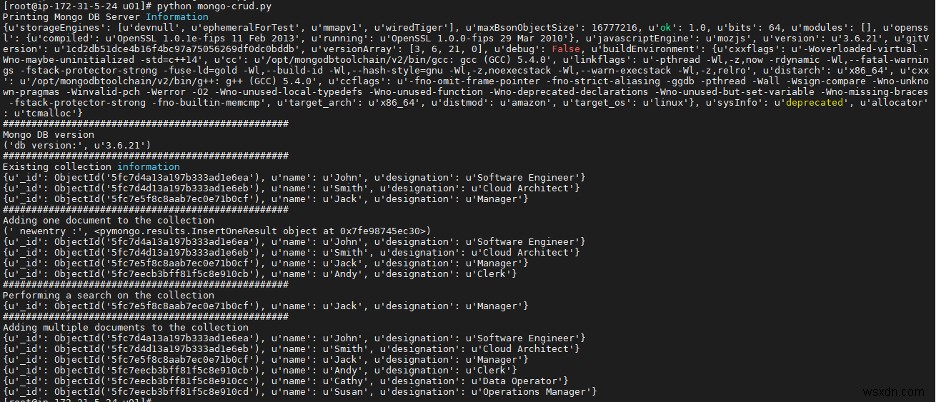
#!/usr/bin/python from pymongo import MongoClient client = MongoClient(host = 'localhost:27017', username="dba", password="user123") mongodbinfo = client.server_info() print ("Printing MongoDB Server Information") print (mongodbinfo) print ("##################################################") print ("Mongo DB version") print ("db version:", mongodbinfo["version"]) print ("##################################################") db = client.empdb empdetails = db.employeedetails print ("Existing collection information") printcollection = empdetails.find() for i in printcollection: print (i) print ("##################################################") print ("Adding one document to the collection") details = {"name": "Andy", "designation": "Clerk"} newentry = empdetails.insert_one(details) print (" newentry:", newentry) printcollection1 = empdetails.find() for i in printcollection1: print (i) print ("##################################################") print ("Performing a search on the collection") search = empdetails.find_one({ 'name' : 'Jack'}) print (search) print ("##################################################") print ("Adding multiple documents to the collection") entry1 = {"name": "Cathy", "designation": "Data Operator"} entry2 = {"name": "Susan", "designation": "Operations Manager"} newentries = empdetails.insert_many([entry1, entry2]) printcollection2 = empdetails.find() for i in printcollection2: print (i) -
Thực thi Python script bằng lệnh sau. Output trông giống như hình ảnh sau:
# python mongo-crud.py
Kết luận
Python là một trong những ngôn ngữ lập trình trending nhất năm 2020 với nhiều triển khai rộng rãi. Python cung cấp cho database engineer các lựa chọn thay thế shell scripting cho tự động hóa task database.
Tìm hiểu thêm về dịch vụ Database của chúng tôi.
Sử dụng tab Feedback để đưa ra nhận xét hoặc đặt câu hỏi. Bạn cũng có thể bắt đầu cuộc trò chuyện với chúng tôi.